
Penitent's End: Shadow Ruins Guide
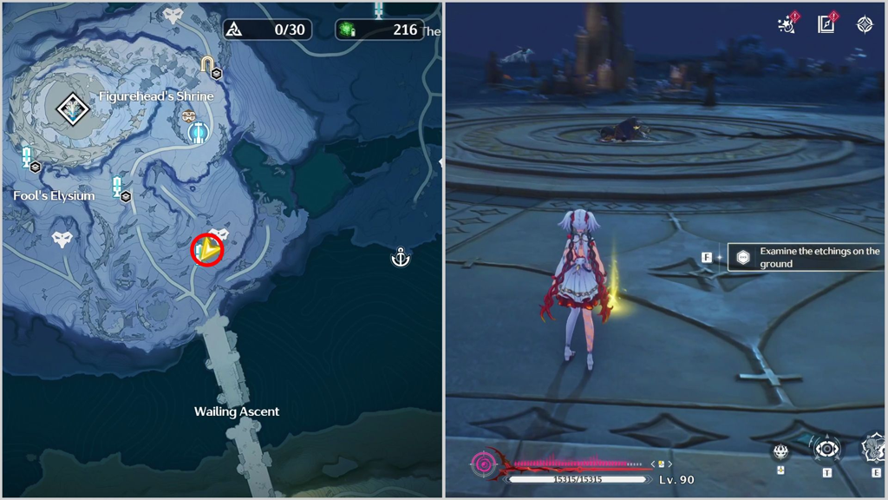
Penitent's End, a misty island of towering cliffs and ringed ruins, hides several treasure chests behind more than just exploration. Four specific ruins are tied to the 'Quest of Faith'—the 'Ruins Where Shadows Roam' challenges. To claim their chests, you must battle Tacet Discords that can enter a Shadow state, rendering them immune to damage. The only way to break this state is to lure them into the light of a Macabre Torch. Fae Ignis Echoes scattered around each arena can ignite these torches with their fire, and you'll need to master this interplay of light and shadow.
First Ruin: South of Figurehead's Shrine
Teleport to the Resonance Beacon south of the region's main Nexus. Approach the shining spot on the ground and examine the etchings to spawn a single shadow enemy. Lure it to the nearby lit Macabre Torch to dispel its immunity, then defeat it. After the fight, read Journal Page I to spawn a Standard Supply Chest.
Second Ruin: Southwest of the First
Here, the three Macabre Torches are unlit. Use the lone Fae Ignis Echo to ignite all three torches by baiting its fire. Only after all three are lit will the shadow enemy appear. The fight follows the same pattern—keep the enemy within a torch's light to dispel its Shadow state.
Third Ruin: West of Fool's Elysium
A single Macabre Torch is already lit, and the boss appears immediately. You must fight while keeping the torch lit. If the enemy extinguishes it, a new Fae Ignis Echo will respawn to help you relight it. Read the Journal Page afterward for another Standard Chest.
Fourth Ruin: North of the Dragon of Dirge
This is the hardest challenge. Multiple shadow enemies spawn and will actively extinguish the torches at certain HP thresholds. Three Fae Ignis Echoes arrive to assist, but you'll need a strong team—preferably with a healer—to survive the prolonged fight. After victory, read the final Journal Page to claim a Premium Supply Chest, unlock the hidden achievement 'We're All Alone', and access Dream Patrol Challenges at Penitent's End.
Wuthering Waves Lunites: Usage and Acquisition
Wuthering Waves Lunites is the premium in-game currency that allows players to purchase exclusive items like characters, weapons, and special bundles, enhancing their overall gaming experience.
Players can obtain this currency by topping up through official platforms such as the in-game store or via trusted third-party trading sites that offer secure and convenient transactions.
Additionally, Lunites can be exchanged for Astrites at a 1:1 ratio, giving players more flexibility in acquiring resources without solely depending on gameplay rewards.
Wuthering Waves top up on LootBar
For players looking to top up Wuthering Waves Lunites, the lootbar game trading platform stands out as an excellent choice. Beyond simply enabling a swift wuthering waves recharge, LootBar offers a seamless experience with round-the-clock customer support and a wide array of payment options. Notably, the platform frequently provides attractive discounts—sometimes up to 20% off—making each top up wuwa session more cost-effective. This combination of reliability and value ensures that every purchase feels both secure and rewarding.
Moreover, LootBar’s global reach and professional service make it a preferred destination for gamers. Whether you need to top up Wuthering Waves for the latest character or event, the platform’s intuitive interface and instant delivery minimize waiting time. By choosing LootBar, players gain access to competitive pricing without sacrificing safety, turning routine transactions into a hassle-free part of their gaming journey.
How to top up Wuthering Waves on LootBar
- To begin your WuWa top up journey, first visit the official LootBar website and make sure to select your preferred language and currency before logging in to your account.
- Once logged in, navigate to the top-up section and search for Wuthering Waves in the list of available games.
- Select Wuthering Waves as your game, then decide the quantity of Lunites you wish to purchase and hit the "Top-up Now" button.
- Proceed by choosing a payment method that suits you best and complete the transaction securely.
- After making your payment, fill in the necessary top-up account details such as login method, username, password, and server information when prompted.
- Coordinate with the seller to finalize the WuWa top up process; once they have completed the delivery, check your in-game account to confirm that the Lunites have been credited successfully.
What is the best Gaming Top-Up Platform?
LootBar stands out as a reliable and professional platform for gaming recharge. Its reliability and popularity are reflected in excellent reviews, including a 4.9/5.0 rating on Trustpilot.

 English
 Arabic
 French
 Spanish
 Portuguese
 Deutsch
 Turkish
 Dutch
Dutch
 Italiano
 Romaian
 Portuguese (Brazil)
 Greek
Greek