
How to Add Vanilla Gift Card Billing Address
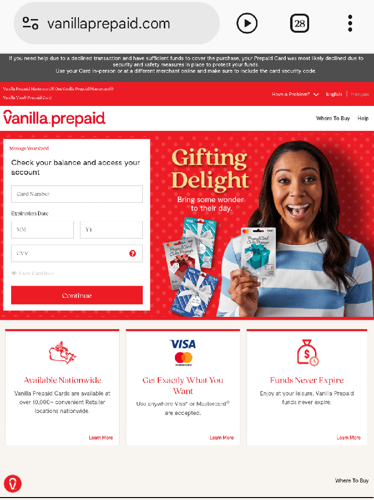
If you have ever tried paying online with your Vanilla gift card only to see a “payment declined” message despite having funds, the problem is often a missing or mismatched billing address. When you check out, merchants use the Address Verification System (AVS) to compare the information you enter with the details registered on the card. A correct billing address prevents these declines and makes future purchases smoother.
Why a Billing Address Matters
Online stores need to verify that the person using the card is authorized. They do this by checking the billing address you provide during checkout against the address linked to the card. If the two match, the payment is more likely to go through. Setting up your billing address also allows you to use the card at merchants that require this information before accepting payment.
How to Add a Billing Address
Visit the official VanillaGift.com website and enter your 16-digit card number, expiration date, and 3-digit CVV to access card management. Navigate to the “Register Card” or “Manage Account” section. Enter your full legal name, street address, city, state, and ZIP code exactly as you use them for shipping or billing. Accuracy is critical—any abbreviation or typo can cause AVS mismatches and declined transactions. Review your details carefully, then save. You should receive a confirmation that the address has been added.
Checking and Updating Your Address
You cannot find the billing address printed on the physical card. To view or edit it, log in to VanillaGift.com with your card credentials and look for the “Manage Account” section. If you need to update your address after moving, click “Update Address,” enter the new information, and confirm. Changes can take a few hours—occasionally up to a day—to synchronize across merchant systems. During this time, try a small test purchase to confirm the update has taken effect.
Common Causes of Declines and Fixes
- Data entry errors: A mistyped card number, wrong CVV, or incomplete ZIP code blocks registration. Double-check every field.
- AVS mismatches: Avoid abbreviations or partial addresses. Use the full street, city, and ZIP exactly as registered.
- Merchant holds: Some merchants place a temporary hold of up to 20% above your purchase. If your balance is too low, the transaction may decline. Try smaller purchases first.
- Merchant acceptance: Not all online stores accept prepaid gift cards. Confirm that the merchant supports Vanilla cards.
If the page fails to load, clear your browser cache or try a different device. Also note that activating the card is different from registering a billing address. Use the “Register Card” tab specifically for address setup.
Where to Buy Vanilla Gift Cards
Prestmit is a digital trading platform where you can buy Vanilla gift cards using Naira, Cedis, US Dollars, or cryptocurrency. After payment, the code is delivered to your email within minutes. The platform offers competitive rates, SSL encryption, two-factor authentication, and 24/7 customer support. You can also find other popular gift cards such as Amazon, Apple/iTunes, Steam, and many more on the platform.
By setting up a correct billing address and understanding common pitfalls, you can avoid payment declines and enjoy a smoother online shopping experience with your Vanilla gift card.
What is Steam Wallet Code (BRL)?
Steam Wallet Code is a digital code that allows users to add funds to their Steam account, making it easy to purchase games, downloadable content, and other items available on the Steam platform. Gamers can obtain Steam Wallet Code by topping up through various trusted game trading platforms such as OffGamers, SEAGM, or Codashop. After redeeming the code, the balance is instantly available for use in buying not only games but also software and in-game content across Steam's vast library. This makes Steam Wallet Code a convenient option for both personal use and gifting to friends or family who enjoy gaming.
Why LootBar is the best choice for buying Steam Wallet Code?
If players are looking to top up their Steam Wallet Code, they may want to consider the lootbar game trading platform for a seamless and reliable experience. LootBar stands out by offering a user-friendly interface and supporting multiple languages, making it accessible to gamers from all over the world. Its collaboration with major game companies ensures that users can purchase not only Steam Wallet Codes but also a variety of other gaming products in one secure location.
One of the key benefits of using LootBar is its commitment to safety and convenience. The platform provides a broad selection of payment methods such as PayPal, Visa, and MasterCard, all processed with advanced encryption technology and anti-fraud monitoring. This means users can complete their transactions quickly and securely, without worrying about the safety of their personal information. Additionally, LootBar guarantees instant delivery of your Steam Wallet Code, so you can start enjoying your favorite games on Steam without delay.
Moreover, LootBar regularly features exclusive promotions, special bundles, and reward bonuses, giving players extra value with every purchase. If users ever have questions or need assistance, the platform’s professional customer support team is available around the clock to help resolve any issues. With these advantages, LootBar makes purchasing Steam Wallet Codes both easy and rewarding for gamers everywhere.
How to buy Steam Wallet Code (BRL) on LootBar?
To acquire a Steam Gift Card through the LootBar platform, adhere to the following process.
1. Navigate to the official LootBar website, adjust the language and currency tiles to your preference, and log into your account.
2. On the home interface, locate the Gift Card menu and pick the Steam Gift Card entry.
3. Choose the card's region (for example, BRL for Brazil) and the desired gift card amount.
4. Advance to the top‑up screen to review the details of your Steam Gift Card order.
5. Select a suitable payment option and finalize the purchase; the Steam Gift Card code will be delivered to you promptly.
What is the best Gaming Top-Up Platform?
As a trusted choice for gaming top-up, LootBar offers both top speed and affordability. The platform has earned a reputation as the best platform for gaming recharge, supported by outstanding customer feedback—4.9/5.0 on Trustpilot.

 English
 Arabic
 French
 Spanish
 Portuguese
 Deutsch
 Dutch
Dutch
 Italiano
 Russian
 Romaian
 Portuguese (Brazil)
 Greek
Greek